Table of Contents
ToggleA quality 4K projector transforms a room into a dedicated home theater that rivals the cinema experience. Unlike flat-panel TVs limited by diagonal size and viewing angles, projectors deliver expansive images, 100 inches or more, with superior immersion and flexibility. Whether you’re a movie enthusiast, sports fan, or gamer, the right 4K projector elevates entertainment in ways standard displays simply can’t match. The market now offers strong options across multiple price points, so homeowners can find reliable 4K projection without maxing out the budget. This guide walks you through the essential features, top performers, and installation best practices to help you choose the right projector for your space.
Key Takeaways
- A 4K projector delivers four times the pixel count of 1080p with sharper detail and superior immersion across 100+ inch screens, offering cinematic scale that flat-panel TVs cannot match.
- Choose brightness levels based on your room: 1000–2000 lumens for dark dedicated theaters, 2500+ lumens for rooms with ambient light or larger spaces.
- Short throw and ultra-short throw 4K projectors enable flexible installation in small rooms or living spaces, with mounting options ranging from ceiling to wall shelves.
- Laser-based projectors outperform traditional lamps with 20,000+ hour lifespan and better color consistency, though they cost more upfront and require improved ventilation.
- Proper installation—including ceiling mounting into joists, quality projection screens, lens focus calibration, and adequate ventilation—unlocks the image quality that justifies your investment.
- Budget ($1,500–$2,500), mid-range ($2,500–$5,000), and premium ($5,000+) tiers each serve different room conditions; a budget projector in a blacked-out theater often outperforms a premium unit in a poorly lit living room.
Why Upgrade To A 4K Projector For Your Home Theater
A 4K resolution (3840 × 2160 pixels) delivers four times the pixel count of 1080p, which means sharper text, finer detail, and smoother motion. If you’ve watched content on a good 4K TV, the detail is noticeable, now imagine that spread across a 120-inch screen. Projectors excel in dim or dedicated theater rooms because they emit light rather than relying on ambient brightness. This fundamental difference makes them ideal for dark, controlled spaces where contrast and shadow detail truly shine.
Cost-per-inch is another major win. A 120-inch 4K projector screen costs far less than a comparably sized TV (which doesn’t really exist in consumer form). Add in the theatrical experience, that sense of being inside the frame rather than watching through a window, and you understand why home theater enthusiasts upgrade. Modern 4K projectors also integrate smart features like lens shift, keystone correction, and wireless connectivity, removing old barriers to ease of setup.
Shifting from a TV to projection also opens project potential. Some homeowners build a dedicated theater room, while others want flexibility in living spaces. A quality projector paired with a motorized screen gives you the best of both worlds: impressive entertainment and a clean, uncluttered look when not in use.
Key Features To Consider Before You Buy
Brightness, Contrast, And Image Quality
Brightness is measured in lumens. For dark dedicated theater rooms, 1000–2000 lumens suffices: brighter rooms need 2500+ lumens. If you plan to use the projector with some ambient light or in a larger space, don’t cheap out, underpowered projectors deliver washed-out images no matter the resolution.
Contrast ratio determines how deep the blacks appear and how much shadow detail you retain. Look for projectors rated at least 10,000:1. Higher is better, but real-world performance depends on the lens quality and image processing as well as raw specs.
Color accuracy matters more than many DIYers realize. A projector with poor color gamut makes reds look orange and blues look purple. Check reviews or demo units before buying: specs alone don’t tell the story. Many manufacturers now include HDR (High Dynamic Range) support, which expands the color and brightness range for compatible content.
Throw Distance And Room Size Compatibility
Throw distance is the distance from the projector to the screen. Standard throw projectors sit 8–15 feet from a 120-inch screen, while short throw models work 4–7 feet away. If your room is small or you want the projector mounted near the screen (or above it), short throw is essential. Ultra-short throw (under 3 feet) lets you mount a projector almost right against the wall, useful for living rooms and smaller dedicated spaces.
Measure your room carefully. You’ll need space for the projector, clearance around the lens, and a path for heat exhaust. Mounting also matters: ceiling mounts are standard for dedicated rooms, but wall or shelf mounts work for flexible setups. Check that your ceiling or wall can support the weight (most 4K projectors run 5–15 pounds).
Screen size depends on throw distance and room depth. Use the projector’s specifications to calculate the image size at your intended distance. A rule of thumb: viewers should sit 1.5 times the screen height away for comfortable viewing. For a 120-inch screen (roughly 60 inches tall), that’s a 90-inch viewing distance, realistic for most home theater rooms but tight for small living spaces.
Top 4K Projectors For Different Budgets And Spaces
The 4K projector market splits into three tiers: budget-friendly ($1500–$2500), mid-range ($2500–$5000), and premium ($5000+). Each tier trades off brightness, color accuracy, and build quality, so your choice depends on room conditions and content priorities.
Budget options like the Hisense C2 and BenQ TK850 deliver solid 4K brightness and acceptable contrast for the price. These work well in dark, dedicated rooms where brightness requirements stay modest. They’re less color-accurate than pricier models, so movie enthusiasts may notice soft colors and less shadow detail.
Mid-range projectors from Epson, BenQ, and Optoma offer better optics, brighter images, and superior color handling. These suit homeowners with mixed room lighting or anyone who values flexibility. Many include motorized lens shift (which moves the lens to center the image without distortion, critical for ceiling-mounted units) and stronger processors for motion smoothing and noise reduction.
Recent best projector models show that laser projectors continue gaining ground in the mid-to-premium space. Laser-based light sources last longer (20,000+ hours vs. 5,000–8,000 for lamps), produce brighter images, and maintain color consistency over time. The trade-off: they cost more upfront and run hotter, requiring better ventilation.
Premium projectors prioritize laser light, exceptional color accuracy, and build quality. These are for serious enthusiasts or dedicated home theater installations. They justify the cost through durability, brightness, and image quality that truly showcases high-end content.
Choose based on your room’s light control, desired screen size, and how much you’ll use the projector. A budget projector in a blacked-out theater room often outperforms a premium unit in a living room with poor light control.
Installation And Setup Tips For Maximum Performance
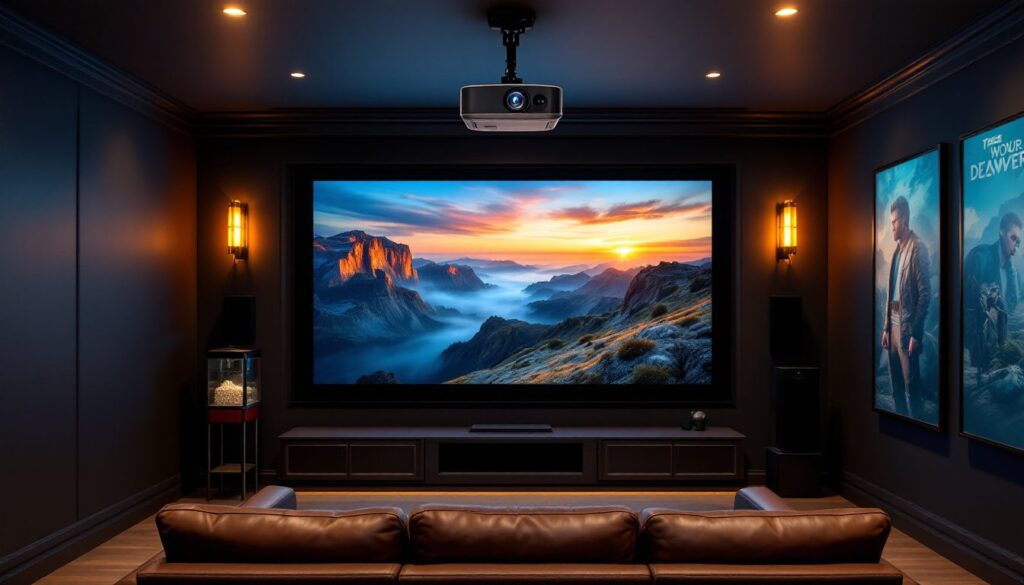
Ceiling mounting is standard for dedicated theater rooms. You’ll need a sturdy ceiling (check for joists) and a quality projector mount rated for your model’s weight. Avoid drywall anchors: drive bolts directly into joists using washers and lock nuts. Use a digital level to ensure the projector is perfectly straight, even slight tilting causes keystone distortion, which softens the image and makes text fuzzy.
If ceiling mounting isn’t viable, wall shelf mounts work for short-throw and ultra-short-throw models. Ensure the shelf is rock-solid: projectors amplify vibration, so any flex degrades image stability.
Screen selection is easy to overlook but critical. Don’t just project on a white wall. A proper projection screen has specific reflectivity and diffusion properties that recover lost light and improve contrast. Fixed screens cost $300–$800 for a quality 120-inch model: motorized screens add $500–$1500 but let you hide the screen when not in use, a real benefit in multipurpose rooms.
Lens focus and keystone correction come next. Use a test pattern (most projectors include one, or download free ones online) to fine-tune focus across the entire image. For ceiling-mounted units, lens shift lets you move the image without distortion, use it first before resorting to digital keystone, which softens the picture.
Cable management matters more than you’d think. Run HDMI cables in cable trays or raceways to avoid mess and tripping hazards. If you’re mounting overhead, secure cables with clips every 18 inches to prevent sagging. Long HDMI runs (over 50 feet) may need repeaters or fiber-optic cables to avoid signal loss.
Finally, ventilation keeps the projector cool and extends lamp or laser life. Ensure airflow around intake and exhaust vents, blocked vents cause thermal shutdowns and shorten component life. Leave at least 6 inches of clearance on all sides, and avoid carpet or dust-covered surfaces beneath the unit.
Once installed, calibrate color and brightness using your projector’s menu and a test image. Most projectors include eco and cinema modes: cinema mode prioritizes color accuracy over brightness, which suits dark rooms perfectly. Don’t skip this step, a few minutes of calibration unlocks the image quality you paid for. For home automation and smart displays, many modern projectors integrate with voice assistants and wireless streaming, so check that your model supports your ecosystem.
Conclusion
A 4K projector rewires how you experience entertainment at home, offering cinematic scale and immersion that TVs can’t touch. Your decision boils down to three factors: room conditions (darkness, ambient light, size), throw distance and mounting constraints, and budget. Take the time to measure your space, understand throw distance, and choose a brightness rating that matches your environment. Smart installation, proper mounting, screen quality, and cable management, ensures years of reliable performance. Whether you’re building a dedicated theater or adding projection to a flexible living space, the right 4K projector elevates every viewing session. Research reviews and, if possible, demo units before committing: seeing 4K projection in action beats any spec sheet.